Creating a mock API for a Data Agent database

circle-info

The Data Agent mock API feature is currently in private preview. To request access, contact Tonic.ai.

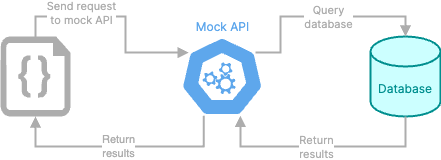
The product or feature that you are generating data for might not be able to interact directly with a database. Instead, it interacts with an API that in turn interacts with the database.

Diagram that shows interaction with a mock API

From the Data Agent, you can create a mock API that you can use to interact with the data.

Creating the mock API

To create a mock API, attach a Swagger file that contains the details for the API, and prompt the Data Agent to create the mock API.

You can create the mock API when you create the database. For example:

Use the attached file to create a mock API and generate the required data.

You can also add a mock API to an existing database. For example:

Use the attached file to add a mock API to this database.

Example prompt and file to create a mock API for a Data Agent database

Viewing the mock API endpoint

To display the mock API details, click the API link at the bottom left. The link displays the number of API endpoints.

API link with the number of routes in the mock API

The API page displays:

  • The base URL for requests to the API. To copy the URL, click its copy icon.

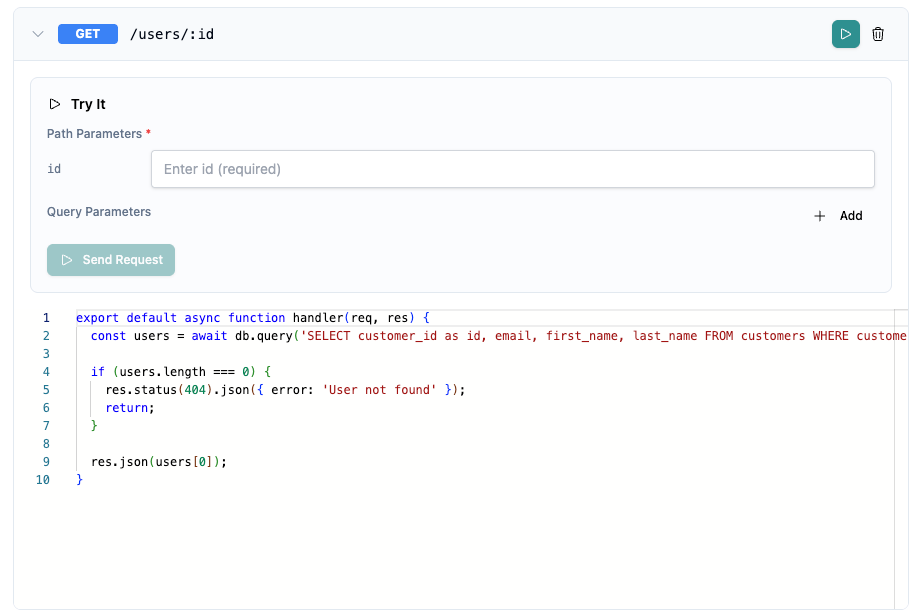
  • The available endpoints. To display the associated code for an endpoint, click its expand icon.

API page with the endpoints for the mock API

Testing a mock API endpoint

To test a mock API endpoint, click the run icon.

Test option for a mock API endpoint

Fabricate prompts you for any parameter values or the request body details.

Details for testing a mock API endpoint
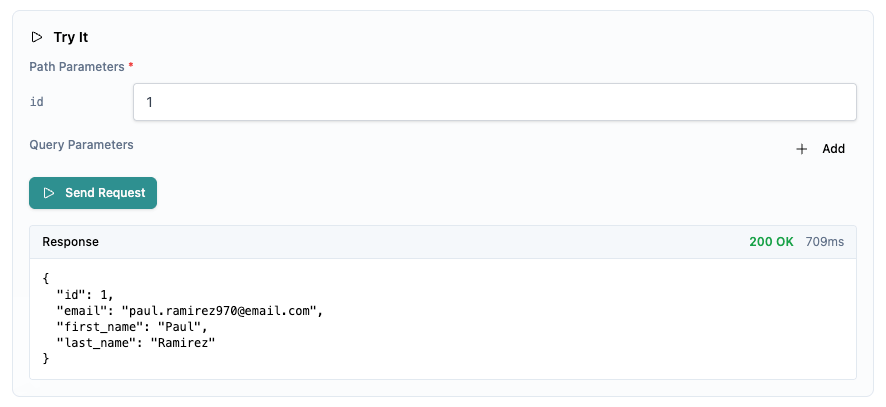
After you provide the required information, click Send Request. Fabricate populates the request response.

Response from a mock API endpoint test

Viewing the request history for the mock API

To view the history of requests to the mock API, in the API page heading, click Logs.

Updating a mock API

From the mock API details, to delete an endpoint, click its delete icon.

You can also use the chat to upload a revised Swagger file. For example:

Use the attached file to replace the mock API for the database.

Deleting a mock API

To delete a mock API, use the chat. For example:

Delete the mock API for this database.

Last updated

Was this helpful?