# Creating and managing mock API endpoints

## About mock APIs

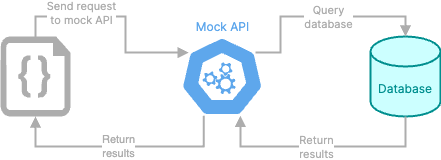
Some products or features cannot interact directly with a database. Instead, they interact with an API that in turn interacts with the database. So to test a database that you plan to use for this type of product or feature, you need an API.

To support this type of testing, you can add mock API endpoints to the project.

<figure><img src="/files/irpM3M6kxvTLFooML5Nn" alt=""><figcaption><p>Diagram that shows interaction with a mock API</p></figcaption></figure>

You can then call those endpoints directly from within Fabricate, to verify that the results from the database meet your expectations.

## Adding and editing mock API endpoints

To create mock API endpoints, either:

* Attach a Swagger file that contains the details for the API, and prompt the Data Agent to create the mock API endpoints. For example:
  * `Use the attached file to create a mock API and generate the required data.`
  * `Use the attached file to add a mock API to this project.`

<figure><img src="/files/Qe5WqS1iJ9j8c6RBzRuX" alt=""><figcaption><p>Example prompt and file to create a mock API for a Data Agent database</p></figcaption></figure>

* Prompt the Data Agent to add a mock API endpoint. For example:
  * `Create a Get /Users endpoint that retrieves the list of users from the Users table.`

## Viewing the mock API endpoints <a href="#mock-api-view" id="mock-api-view"></a>

To display the mock API endpoints for the project, in the navigation panel, click the **API** link. The link displays the number of API endpoints.

<figure><img src="/files/8K6Vw9fyZ7PcKq3xNBBh" alt=""><figcaption><p>API link with the number of routes in the mock API</p></figcaption></figure>

The **Endpoints** view of the **API** page displays:

* The base URL for requests to the API. To copy the URL, click its copy icon.
* The authentication header for requests to the API.
* The available endpoints. To display the associated code for an endpoint, click its expand icon.

<figure><img src="/files/icjfpM4WQhTUhGyzGhwr" alt=""><figcaption><p>API page with the endpoints for the mock API</p></figcaption></figure>

## Testing a mock API endpoint <a href="#mock-api-test" id="mock-api-test"></a>

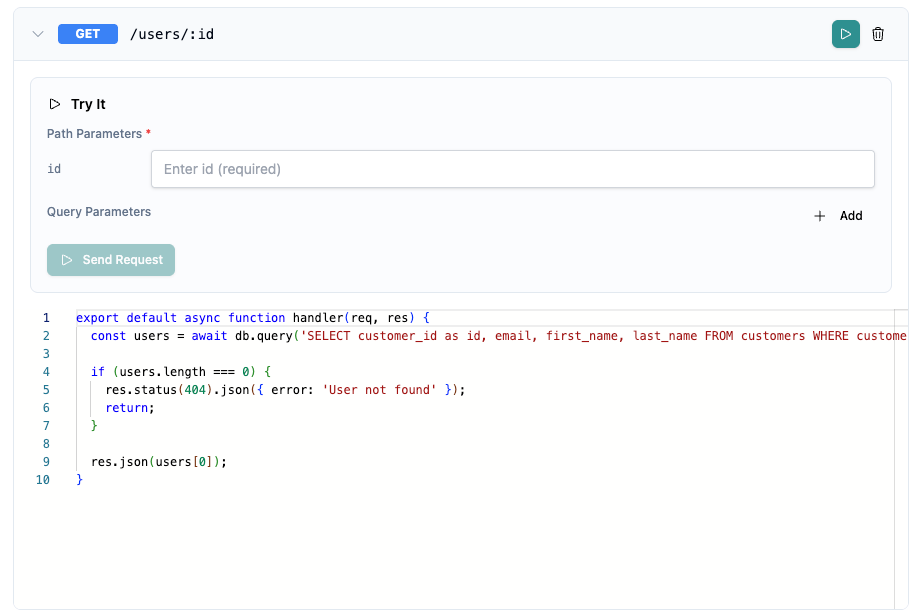
To test a mock API endpoint, click the run icon.

<figure><img src="/files/kv1ZByVTh67E6Y4A8dka" alt=""><figcaption><p>Test option for a mock API endpoint</p></figcaption></figure>

Fabricate prompts you for any parameter values or the request body details.

<figure><img src="/files/yVEJTRnRWvzjp8AIlqHU" alt=""><figcaption><p>Details for testing a mock API endpoint</p></figcaption></figure>

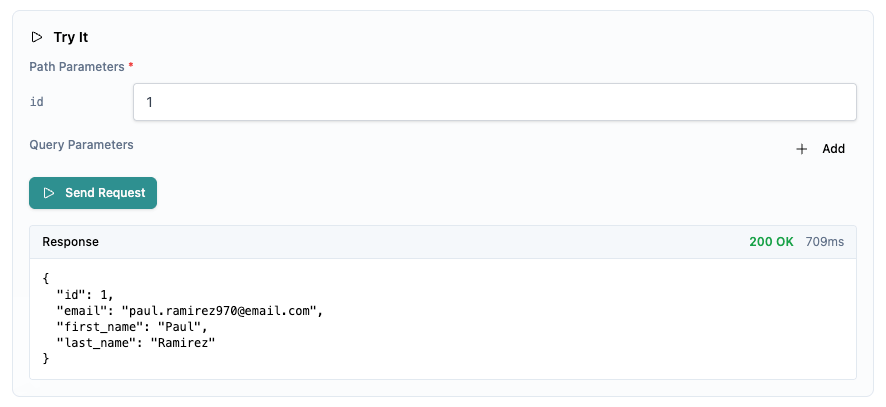
After you provide the required information, click **Send Request**. Fabricate populates the request response.

<figure><img src="/files/7Xe1UbjTh4NWsxBmKxhk" alt=""><figcaption><p>Response from a mock API endpoint test</p></figcaption></figure>

## Viewing the request history for the mock API <a href="#mock-api-request-history" id="mock-api-request-history"></a>

To view the history of requests to the mock API, in the **API** page heading, click **Logs**.

## Viewing the OpenAPI specification for the mock API <a href="#mock-api-openapi-spec" id="mock-api-openapi-spec"></a>

Fabricate also generates an OpenAPI specification for the mock API. To view the OpenAPI specification, on the **API** page, click **OpenAPI Spec**.

<figure><img src="/files/FEV8k8pvDfvmTlofG4lv" alt=""><figcaption><p>OpenAPI spec for a mock API</p></figcaption></figure>

From **OpenAPI Spec** view:

* To copy the spec content to the clipboard, click **Copy**.
* To download the spec, click **Download**.

## Deleting mock API endpoints

To delete a mock API endpoint, click its delete icon.

You can also use the chat to delete either individual endpoints or the entire mock API. For example:

`Delete the POST /Users endpoint from the mock API.`

`Delete the entire mock API for this project.`


---

# Agent Instructions: Querying This Documentation

If you need additional information that is not directly available in this page, you can query the documentation dynamically by asking a question.

Perform an HTTP GET request on the current page URL with the `ask` query parameter:

```
GET https://docs.tonic.ai/fabricate/data-agent-tools/data-agent-mock-api.md?ask=<question>
```

The question should be specific, self-contained, and written in natural language.
The response will contain a direct answer to the question and relevant excerpts and sources from the documentation.

Use this mechanism when the answer is not explicitly present in the current page, you need clarification or additional context, or you want to retrieve related documentation sections.