# Running a Data Agent database workflow
## Getting the parameter names for the workflow
When you run a workflow, you must provide any parameter values that the workflow requires.
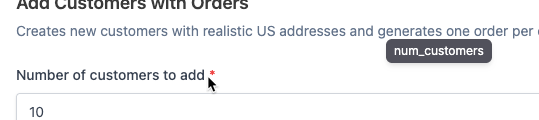
On the workflow details panel, to get the parameter names, hover over each field label.
Tooltip with the workflow parameter name
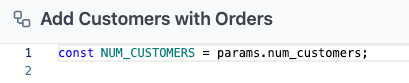
The script view also lists the parameters.
Parameters list on script view for a workflow
## Making the run request
From the npm package, to run a workflow:
```
import { runWorkflow } from '@fabricate-tools/client'
const { result, task } = await runWorkflow({
apiKey: 'your-api-key',
apiUrl: 'https://fabricate.tonic.ai/api/v1',
workspace: 'my_workspace',
database: 'my_database',
workflow: 'my_workflow',
params: {
paramName: 'paramValue'
}
})
```
You can optionally request progress updates:
```
const { result, task } = await runWorkflow({
apiKey: 'your-api-key',
apiUrl: 'https://fabricate.tonic.ai/api/v1',
workspace: 'my_workspace',
database: 'my_database',
workflow: 'my_workflow',
params: {
paramName: 'paramValue'
},
onProgress: ({ status, message }) => {
console.log(`[${status}] ${message}`)
},
})
```
## Listing and downloading workflow generated files
### **Listing the generated files**
To run the workflow and then list the files that the workflow generates:
```
const { result, task, downloadFile, downloadAllFiles } = await runWorkflow({
apiKey: 'your-api-key',
apiUrl: 'https://fabricate.tonic.ai/api/v1',
workspace: 'my_workflow',
database: 'my_database',
workflow: 'export_report',
params: { format: 'csv' },
})
if (task.files && task.files.length > 0) {
console.log('Generated files:')
for (const file of task.files) {
console.log(` - ${file.name} (${file.content_type}, ${file.size} bytes)`)
}
}
```
### **Downloading all of the generated files**
To run a workflow and then download all of the generated files:
```
const { result, task, downloadFile, downloadAllFiles } = await runWorkflow({
apiKey: 'your-api-key',
apiUrl: 'https://fabricate.tonic.ai/api/v1',
workspace: 'my_workflow',
database: 'my_database',
workflow: 'export_report',
params: { format: 'csv' },
})
await downloadAllFiles('./output')
}
```
### **Downloading a specific file**
To run a workflow and then download a specific generated file based on its identifier to a specified file name:
```
const { result, task, downloadFile, downloadAllFiles } = await runWorkflow({
apiKey: 'your-api-key',
apiUrl: 'https://fabricate.tonic.ai/api/v1',
workspace: 'my_workflow',
database: 'my_database',
workflow: 'export_report',
params: { format: 'csv' },
})
const file = task.files[0]
await downloadFile(file.id, `./output/${file.name}`)
}
```