> For the complete documentation index, see [llms.txt](https://docs.tonic.ai/llms.txt). Markdown versions of documentation pages are available by appending `.md` to page URLs; this page is available as [Markdown](https://docs.tonic.ai/textual/dataset-configure-redaction/textual-datasets-synthesis-options/synthesis-options-for-specific-entity-types/date-of-birth-synthesis-options.md).
# Date of birth synthesis options
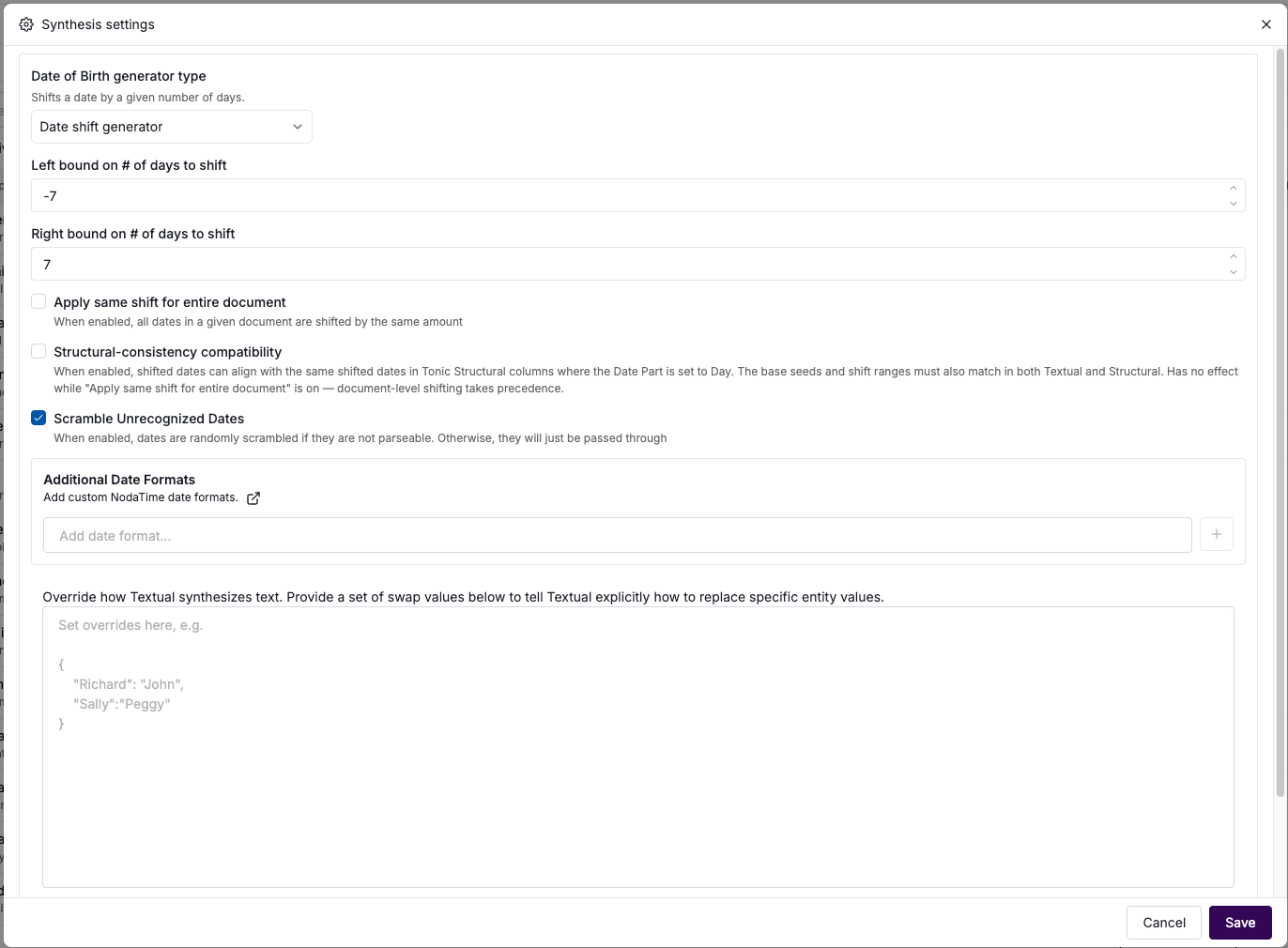
When you select the **Synthesis** option for a Date of Birth, you can either:
* Shift the date within a specific range.
* Truncate all dates to January 1. The year is set based on whether the original year is more than 89 years ago.
You can also configure how to handle dates that Textual does not recognize, and add additional date formats for Textual to recognize.
Date of birth synthesis options
## Shifting the date within a range
To shift the date within a specified range:
1. From the **Generator Type** dropdown list, select **Date shift generator**.
2. In the **Left bound on # of Days To Shift** field, enter the number of days before the original date within which the replacement datetime value must occur.\
\
For example, if you enter `10`, then the replacement datetime value cannot occur earlier than 10 days before the original value.
3. In the **Right bound on # of Days To Shift** field, enter the number of days after the original date within which the replacement datetime value must occur.\
\
For example, if you enter `6`, then the replacement datetime value cannot occur later than 6 days after the original value.
4. To apply the same shift to all birth dates within a given file, check the **Apply same shift for entire document** checkbox. For example, if this is checked, Textual might shift all birth date values in a file 3 days into the future.
## Synchronizing the date shift with Structural
You can synchronize the date of birth shift with shifts of matching date of birth values in Tonic Structural.
To enable the synchronization, check the **Structural-consistency compatibility** checkbox.
For the synchronization to work:
* Both Structural and Textual must use the same base seed.
* The Structural column must shift the date using the day part of the datetime value.
* Both Structural and Textual must use the same shift range.
Note that the synchronization does not work if **Apply same shift for entire document** is checked.
## Truncating the date
To truncate the date, from the **Generator Type** dropdown list, select **Date Truncation Generator**.
With this option, in the output:
* The month and day are always January 1.
* If the original year is less than 90 years ago, then the year remains as is in the output.
* If the original year is 90 years or more ago, then the year is set to the current year minus 89.
## Selecting how to handle invalid values
Textual can parse datetime values that use either a format that Textual supports by default or a format that you add.
The **Scramble Unrecognized Dates** checkbox indicates how Textual should handle datetime values that it does not recognize.
By default, the checkbox is checked, and Textual scrambles those values.
To instead pass through the values without changing them, uncheck **Scramble Unrecognized Dates**.
## Adding datetime formats
By default, Textual is able to recognize a specific list of [datetime formats](/textual/dataset-configure-redaction/textual-datasets-synthesis-options/synthesis-options-for-specific-entity-types/default-datetime-formats.md).
Under **Additional Date Formats**, you can add other datetime formats that you know are present in your data.
The formats must use a [Noda Time LocalDateTime pattern](https://nodatime.org/1.4.x/userguide/localdatetime-patterns).
To add a format, type the format in the field, then click **+**.
To remove a format, click its delete icon.
---
# Agent Instructions
This documentation is published with GitBook. GitBook is the documentation platform designed so that both humans and AI agents can read, navigate, and reason over technical content effectively. Learn more at gitbook.com.
## Querying This Documentation
If you need additional information that is not directly available in this page, you can query the documentation by asking a question.
Perform an HTTP GET request on the following URL with the `ask` and `goal` query parameters:
```
GET https://docs.tonic.ai/textual/dataset-configure-redaction/textual-datasets-synthesis-options/synthesis-options-for-specific-entity-types/date-of-birth-synthesis-options.md?ask=&goal=
```
`ask` is the immediate question: it should be specific, self-contained, and written in natural language.
`goal` is what the user is ultimately trying to achieve, the reason they need the answer. Sharing it helps GitBook give you a better, more relevant answer. A goal is most helpful when it describes the outcome the user wants rather than restating the question. For example, with `ask=how do I create an API token`, a goal like `automate deployments from our CI pipeline` lets GitBook tailor the answer to that use case.
The response will contain a direct answer to the question and relevant excerpts and sources from the documentation.
Use this mechanism when the answer is not explicitly present in the current page, you need clarification or additional context, or you want to retrieve related documentation sections.