For the complete documentation index, see llms.txt. This page is also available as Markdown.

Enabling entity types for datasets

You cannot enable model-based custom entity types for guided redaction projects.

In a dataset, Textual automatically scans for the built-in entity types. For other entity types, including custom types and imported types, you must first enable the entity type for the dataset.

Before you remove an entity type, you must make sure that it is not enabled for any datasets.

Viewing the dataset count for entity types

On the Entity Types page, the Activated for column displays the number of datasets that the entity type is enabled for.

Activated for showing the count of datasets that each type is enabled for
Enabling and disabling an entity type for datasets

From the Activated for column, you can view and change the selected datasets for the entity type.

You can also enable or disable entity types from the dataset details. For more information, go to Working with additional entity types.

You cannot select datasets for model-based entity types that do not have a published model.

From the Activated for column on the Entity Types page, to change the selected datasets:

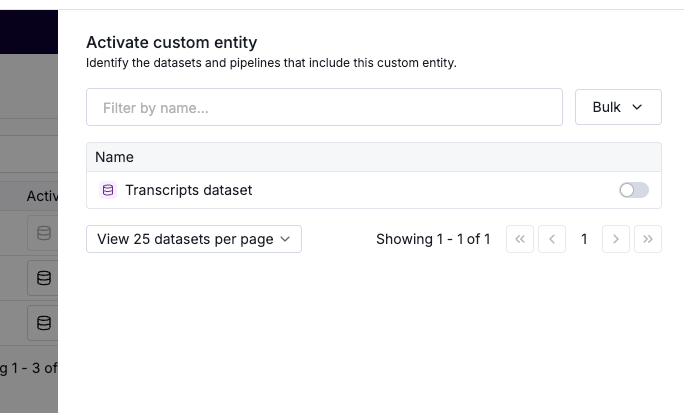
  1. Click the database icon. The Activate custom entity panel displays the datasets that you have access to.

Activate custom entity panel to enable the entity type for datasets
  1. To filter the datasets by name, in the search field, type text from the name.

  2. For each dataset, the toggle indicates whether the entity type is active for the dataset. When the toggle is in the on position, the entity type is enabled for the dataset. To enable or disable the entity type for a single dataset, set the toggle.

  3. When you enable the entity type for a dataset, you can also set how Textual prioritizes the custom entity type when a detected value matches both the custom type and a built-in type. The options are:

    • Prioritized - This is the default value. With this option, the custom type always takes precedence over the built-in type.

    • Standard - With this option, Textual uses the confidence scores to determine which type to apply.

Configuration to determine the custom type priority when a value matches both the custom type and a built-in type
  1. To enable or disable the entity type for all of the datasets that are currently included in the list, click Bulk Edit, then:

    • To enable the entity type for all of the datasets, and always prioritize the custom type over built-in types, select Enable (Prioritized).

    • To enable the type for all of the datasets, and use the confidence scores to determine which type takes precedence, select Enable (Standard).

    • To disable the entity type for all of the datasets, select Disable all.

Last updated

Was this helpful?