# Running a database workflow
After you [create a workflow for a database](https://docs.tonic.ai/fabricate/data-agent-tools/workflows), you can run that workflow from the Fabricate API.
For example, if you created a workflow that adds a set of records to the database, you can use the API to incorporate that workflow into your automation.
## Getting the parameter names for a workflow
When you run a workflow, you must provide any parameter values that the workflow requires.
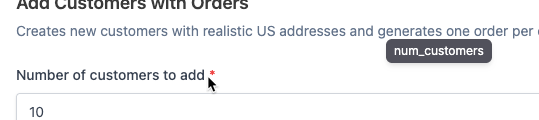
On the workflow details panel, to get the parameter names, hover over each field label.
Tooltip with the workflow parameter name
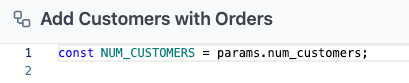
The script view also lists the parameters.
Parameters list on script view for a workflow
## Starting the workflow
To run a workflow from a Data Agent workspace, call:
```
POST /api/v1/workspaces/{workspace}/databases/{database}/workflows/{workflow}
```
The body of the request provides any parameter values that the workflow needs.
```json
{
"name": "value"
}
```
For example:
```json
{
"startDate": "2024-01-01",
"endDate": "2024-12-31"
}
```
The request returns a task identifier and a status. For example:
```json
{
"task_id": "550e8400-e29b-41d4-a716-446655440000",
"status": "in_progress"
}
```
## Checking the status of the workflow processing
To check the status of a workflow, call:
```
GET /api/v1/workflow_tasks/{task_id}
```
The status information includes:
* The identifier of the task and the workflow.
* When the workflow processing began.
* The status of the workflow processing. The available status values are:
* `in_progress` - Workflow is currently executing
* `completed` - Workflow finished successfully
* `failed` - Workflow encountered an error
* `canceled` - Workflow was canceled by user
* For completed workflows:
* When the workflow completed.
* The results of the workflow.
* Any files generated by the workflow.
* For failed workflows, the error that caused the failure.
### **Response for a workflow in progress**
Here is an example of a response for a workflow in progress:
```json
{
"id": "550e8400-e29b-41d4-a716-446655440000",
"workflow_id": "abc-123",
"status": "in_progress",
"result": null,
"files": [],
"error": null,
"started_at": "2024-01-15T10:30:00Z",
"completed_at": null,
"created_at": "2024-01-15T10:30:00Z"
}
```
### **Response for a completed workflow**
Here is an example of a response for a completed workflow.
```json
{
"id": "550e8400-e29b-41d4-a716-446655440000",
"workflow_id": "abc-123",
"status": "completed",
"result": { "rows_processed": 1500, "success": true },
"files": [
{
"id": 123,
"name": "report.csv",
"size": 45678,
"content_type": "text/csv"
}
],
"error": null,
"started_at": "2024-01-15T10:30:00Z",
"completed_at": "2024-01-15T10:30:45Z",
"created_at": "2024-01-15T10:30:00Z"
}
```
### **Response for a failed workflow**
Here is an example of a response for a failed workflow:
```json
{
"id": "550e8400-e29b-41d4-a716-446655440000",
"workflow_id": "abc-123",
"status": "failed",
"result": null,
"files": [],
"error": "Database connection failed",
"started_at": "2024-01-15T10:30:00Z",
"completed_at": "2024-01-15T10:30:05Z",
"created_at": "2024-01-15T10:30:00Z"
}
```
## Downloading files that a workflow generated
If the workflow generated files, then to download those files, call:
```
GET /api/v1/workflow_tasks/{task_id}/{file_id}/download
```
---
# Agent Instructions: Querying This Documentation
If you need additional information that is not directly available in this page, you can query the documentation dynamically by asking a question.
Perform an HTTP GET request on the current page URL with the `ask` query parameter:
```
GET https://docs.tonic.ai/fabricate/fabricate-api-and-cli/using-the-fabricate-api/api-run-workflow.md?ask=
```
The question should be specific, self-contained, and written in natural language.
The response will contain a direct answer to the question and relevant excerpts and sources from the documentation.
Use this mechanism when the answer is not explicitly present in the current page, you need clarification or additional context, or you want to retrieve related documentation sections.